If you use Microsoft Calling Plan, the ERS (Emergency Responder Service) capabilities are already built in, which means you have the ability to perform automatic routing to the relevant Public Safety Answering Point (PSAP). There is no additional charge for the license, and it is incorporated into the pricing structure of the calling plan.
Even if you use Operator Connect partner or Teams Phone Mobile partner for PSTN connectivity, you can be rest assured that these solutions include dynamic emergency routing services for users in the United States and Canada.
How does the Teams client know if the employee is in the office or working remotely?
Trusted IP addresses are used to determine whether or not the user’s endpoint is connected to the corporate network. Trusted IP addresses are a collection of the enterprise network’s internet external IP addresses. Only if the user’s external IP address matches an IP address in the trusted IP address database will an attempt to obtain a dynamic policy or location be made.
Requests based on Ethernet/Switch (PortID or ChassisID) and Wireless AccessPoint (BSSID) will be processed regardless of whether the external IP address matches one of the trusted IP addresses as of May 2023. This means that if an Employee is a Work location and the team Client has the BSSID of the Wireless AccessPoint to which it is connected or the Switch port/Mac address, it will display the E911 location associated with these Network Identifiers even if Trusted IP’s are not configured.
When employees are in the office, administrators are required by state law/regulations to update the address to include the floor, quadrant, etc., so that emergency personnel can quickly locate the individual who called 911. Administrators utilize network elements such as Subnet, Switch & Port number, and WiFi to update the address to this level of specificity. This is also called as dynamic emergency calling.
For dynamic emergency calling, the following must occur:
- The network administrator configures network settings as well as the LIS(Location Information Service) to create a network/emergency location map.
- During startup and periodically afterward, or when a network connection is changed, the Teams client sends a location request that contains its network connectivity information to the network settings and the LIS.
- If there’s a network settings site match, emergency calling policies are returned to the Teams client from that site. (For more information about policies, see Configure emergency policies.)
- If there’s an LIS match – an emergency location from the network element the Teams client is connected to is returned to the Teams client. The match is performed in the following order with the first matched result being returned:
- WAP, Wireless Access Point
- Ethernet switch/port
- Ethernet switch
- Subnet
- When the Teams client makes an emergency call, the emergency location is conveyed to the PSTN network.
Therefore, it is necessary to collaborate with the team responsible for the network and infrastructure in order to acquire the network elements. Additionally, there is a requirement to collaborate with the Security, Legal, and Compliance departments in order to gain an understanding of the necessary compliance policies for E911.
Please note that Subnet and WiFi-based locations are supported on all supported Teams clients. Ethernet/Switch (LLDP) is only supported on:
- Windows versions 10.0 and later at this time.
- Mac OS, which requires LLDP enablement software.
- Teams phone with Teams app version 1449/1.0.94.2021110101 and later.
Configure emergency policies
Emergency calling policy – Applies to Calling Plans, Operator Connect, Teams Phone Mobile, and Direct Routing. This policy configures the security desk notification experience when an emergency call is made. You can set who to notify and how they are notified. For example, to automatically notify your organization’s security desk and have them listen in on emergency calls. This policy can either be assigned to users or network sites or both.
If dynamic configuration of security desk notification is required, you must configure both trusted IP addresses and network sites.
For example, this would be required for a company with offices throughout the United States and Canada. When a 911 call is made from the Richmond site, only the Richmond Security desk is notified.
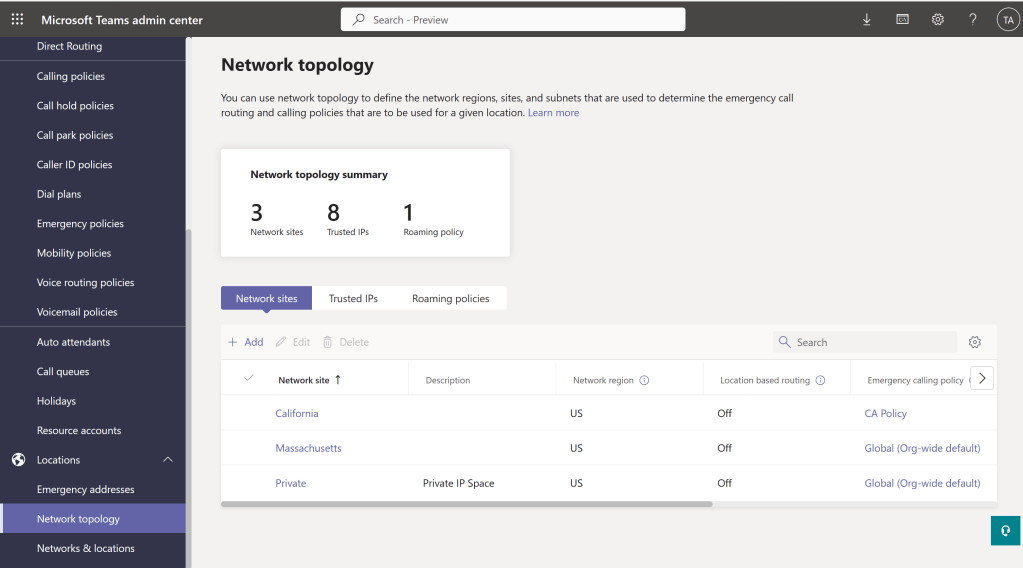
If only dynamic locations are required, you must configure only trusted IP addresses; configuring network settings isn’t required.
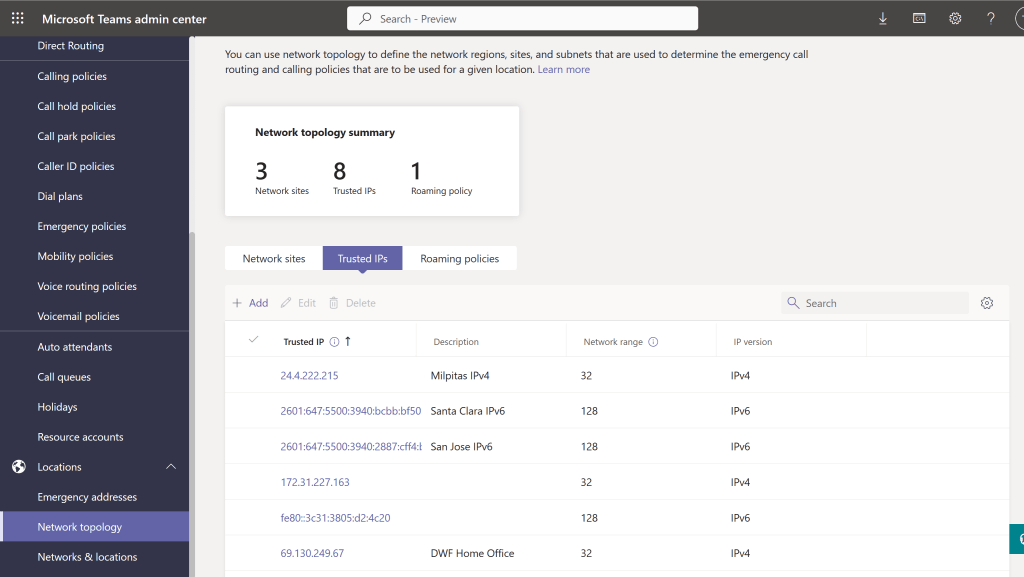
If neither dynamic configuration of security desk notification or dynamic locations are required, configuring network settings isn’t required.
If you assigned an emergency calling policy to a network site and to a user, and if that user is at that network site, the policy that’s assigned to the network site overrides the policy that’s assigned to the user.
Information required for design/implementation
For planning purposes, you would need the following:
- Trusted IP addresses – internet external IP addresses
- Network Sites – For each of the Network sites, you would need the following:
- Location Information Service comprises of the following Network elements, depending on your preference, you would include either of the information
- WAP, Wireless Access Point – Need the BSSID
- Ethernet switch/port – Port and Chassis ID, MAC address used for the Chassis ID (##-##-##-##-##-##).
- Ethernet switch – Chassis ID for each switch to be added, MAC address used for the Chassis ID (##-##-##-##-##-##). Cisco switches can provide this by “show version”.
- Subnet – LIS subnets must be defined by the network ID matching the subnet IP range assigned to clients. For example, the network ID for a client IP/mask of 10.10.10.150/25 is 10.10.10.128
- Emergency Notification policy – This comprises of the following components
- Notification mode – Send Notification only, Conferenced in but are muted, Conferenced in and are unmuted
- Emergency service disclaimer
- Numbers to dial for emergency calls notifications
- Users and groups for emergency calls notifications
- Location Information Service comprises of the following Network elements, depending on your preference, you would include either of the information
- Emergency addresses
- Address and the Country or region
- Incase you need to input the address manually,
- Street number
- Street name
- City
- State
- Zip code
- Latitude
- Longitude
- Places – To specify buildings, floors, or offices at a location, you can add places.
 Talking to Myself
Leave a comment